Multimedia
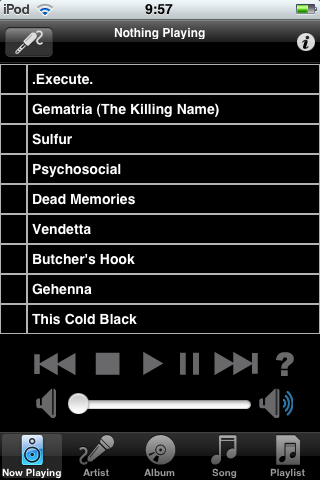
 The MPoD client lets you control your music collection located on an MPD server. Click to enlarge.
 MPoD, for example, can be of great use when you're running a Music Player Daemon (MPD) server to make your music collection available on the network. You can use the iPhone as a remote control for the playlist and comfortably switch songs from your sofa while the daemon runs on a computer in another room. Once you tap on a song, the device connects through Wi-Fi to your MPD server and starts to play it. All you need to do is install the application and enter the connection data in the settings window: the IP address and port for the MPD server and a password to access it.
MPoD offers some interesting choices when it comes to filtering music. You can display only full albums, excluding artists that appear on compilation albums, or use the folder structure as a display to keep music organized by filename instead of ID3 tags. The main interface displays music by artist, album, song name, or by customized playlists.
But not only music servers can be controlled through an iPhone. If you have the MythTV personal video recorder installed, take a look at Remote Remote GH. It's a MythTV remote control application that can connect through Wi-Fi and display your recordings. In features an intuitive user interface that lets you control the MythTV server via a graphical remote displayed on the screen. An open source application that does the same thing is MyMote. In the same way as Remote Remote GH, MyMote can connect to a MythTV back end and display control buttons, helping you retrieve the program guide and set schedules. iPhone users can also try the MythTV for iPhone project, a Web application that can be installed on a MythTV server to allow iPhone and iPod Touch devices to connect to a more graphically compatible front end. You can access a demo from your iPhone for a look at the front end.
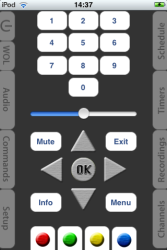 ZapperPro can connect to any Linux VDR hardware. Click to enlarge.
 You can also control the XBMC media center application through an iPhone. XBMC Remote does for it what MyMote does for MythTV. Just specify the host IP address, a password, and a path to the data, and you'll have access to all your movies, audio files, and podcasts. This iPhone application can also display cover images.
If you happen to own a Linux-based video disk recorder, the ZapperPro universal remote control application can connect to any such device. After you install it, go to the global iPhone settings screen and scroll down until you reach the ZapperPro settings. Enter the hostname or IP address of the VDR device, then start the application. It will allow you to control the hardware by sending SVDRP commands through Telnet to the host running the VDR software and let you browse channels, recordings, and schedules, manage volume control, and access basically any function with the remote recorder.
File sharing
Since Linux applications cannot yet connect to the newest Apple device firmware, the best way to transfer files between Linux and the iPhone is by using the built-in WiFi, EDGE, or 3G connectivity. Both Konqueror and Nautilus support accessing WebDAV shares, and there are a few applications for iPhone that can transform the device into a small filesharing server. Files does just that: it allows you to transfer various types of files between your iPhone and your Linux PC by means of Wi-Fi. It can also read PDF, XLS, and DOC files, so saving your work at the office and transporting it home should be easy. You can even view them on the device's screen while in traffic. The lite version of the application is free but has a 200MB file limit.
Another such application is Air Sharing. It works on the same filesharing principle, is compatible with GNOME and KDE applications that support WebDAV, and can also view numerous filetypes, including high-resolution images. It even displays source code files with color-coded formatting. You can access the files stored on the iPhone using a Web browser or a file manager. In Firefox just type the device's IP address and add the 8080 port. In Nautilus or Konqueror you have read/write access to the public shared folder via a WebDAV URL -- for example dav://192.168.1.33:8080/. Air Sharing allows you to set a password to the shared directories. It can display hidden files, and it constantly shows you the remaining free disk space at the bottom of the screen.
Remote control
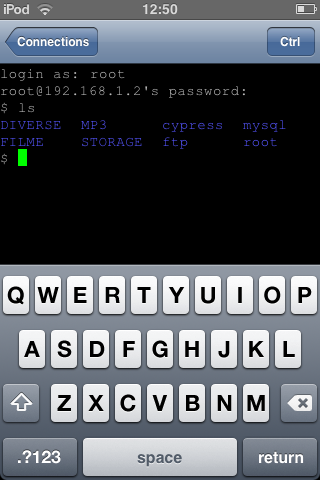
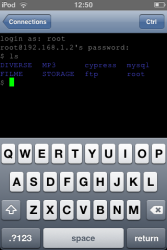 With pTerm you can connect to a host running SSH or Telnet for quick maintenance. Click to enlarge.
 Since the iPhone offers connectivity either by Wi-Fi or 3G, it's no wonder it can be used to check on your servers while on the road. pTerm is a small iPhone application that offers a simple but useful terminal for remote connections. You can predefine a connection and choose one of the three available connection types: SSH, Telnet, or Raw TCP. Enter a nickname for the saved connection, a hostname and a port, then launch the saved entry to access your SSH or Telnet server. You can input commands by using the standard iPhone software keyboard.
A similar application is TN5250 Lite, a terminal emulator for the IBM iSeries midrange server. It supports SSL, zoom and scroll by using your fingers, autologin, different iSeries configurations, and customizable colors. TouchTerm is also free and includes support for Ctrl, Esc, Tab, and arrow keys. If you want to go SSH-specific, try iSSH. It's only a client application and does not support SCP file transfers, but it compensates with a transparent keyboard. Mocha Telnet focuses on establishing Telnet-only connections with machines that run the service.
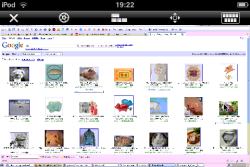 Jaadu VNC lets you control your Linux desktop running a VNC server. Click to enlarge.
 If you'd rather use VNC to administer a desktop, try the free Mocha VNC Lite. It has virtual keyboard and mouse support, 8- and 32-bit color modes, features a landscape mode, and works with RealVNC, TightVNC, UltraVNC, and x11vnc configurations running as hosts. Jaadu VNC is a commercial application that features the same options, but it's more eye-pleasing, and supports an inverted mouse and various key combinations that can be sent to the remote desktop.
The Linux-oriented iPhone application market is not a blooming one, but after all, the AppStore itself is rather young. Until you'll be able to sync your iPhone and iPod Touch music with Linux, some of these applications might help you make the most of the two platforms.